
AI Comic Generator - Comic Art
Novara MilanComics
3.921.00 Reviews
- Version
- 8.0.0
- Installs
- 10.00K
- Age Rating
- Everyone
Screenshots
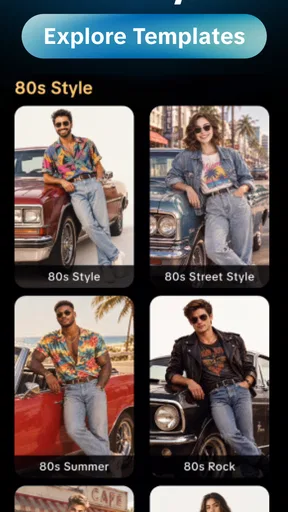

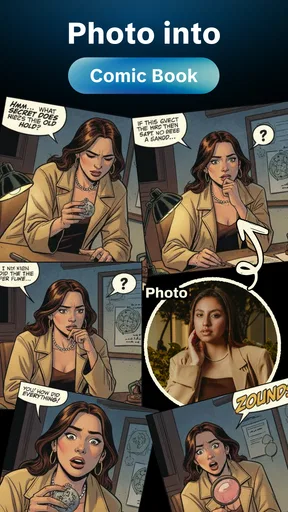
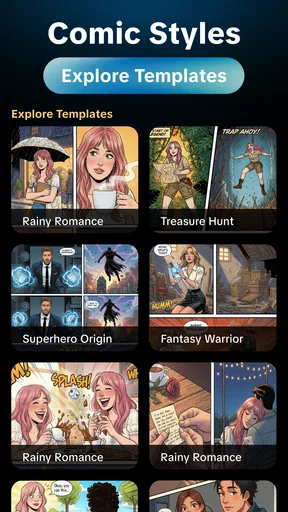
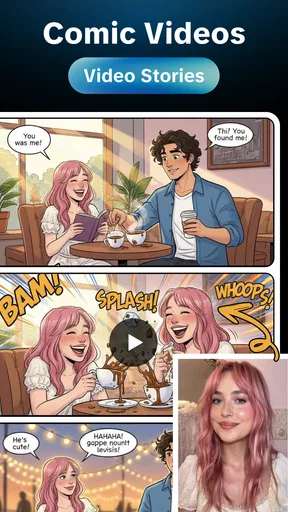
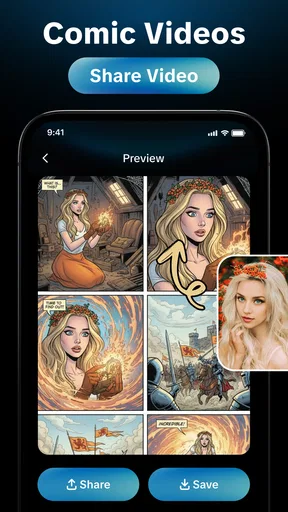
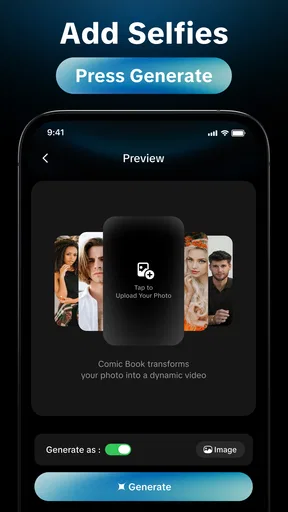
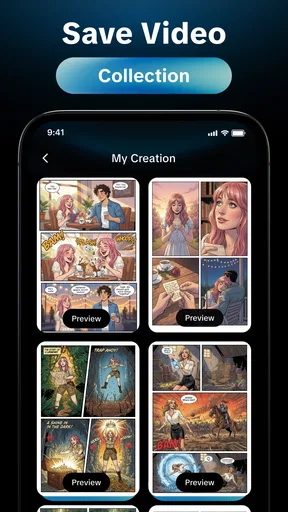
Our Review of AI Comic Generator - Comic Art
 Analysis by Appyee
I can see AI Comic Generator - Comic Art making the most sense in a shared home as a quick creative activity, rather than as a full comic-production suite. One person can bring a rough premise—say, a lost cat returning from an imaginary space mission—and another can suggest a character or a punchline. That kind of back-and-forth is where an AI comic tool can be enjoyable: it gives a group something visible to react to, even when nobody at the table thinks of themselves as an artist.
For a household, though, I’d treat the phone or tablet as the shared workspace, not assume the app provides family profiles or a way to separate each person’s work. Before passing the device around, decide whose project is open and who is allowed to revise it. A simple verbal handoff can prevent someone from changing a scene another person was still shaping. If a comic is intended as a gift or surprise, make a separate plan for keeping the device and project private; shared access can blur those boundaries.
A useful routine for shared devices
I’d start a family session with one clear prompt and a small goal, such as making a single funny scene rather than planning a whole series. Let each person contribute one detail at a time: the setting, the character’s distinctive feature, then what goes wrong. This keeps the creative conversation moving and makes it easier to notice which parts of the generated result actually match the group’s idea.
There is also a practical reason to agree on the prompt before entering it. Several people typing competing instructions can produce a muddled brief, and vague requests are already a weak spot for AI-generated art. I’d have one person type while the others offer suggestions, then review the result together. That small bit of coordination is more useful than expecting the app to organize a group project for you.
Keep expectations and access clear
The app is free to try, while in-app purchases run from $3.99 to $14.99 per item. On a shared device, I’d make sure everyone knows that paid items are not the same as ordinary free use and ask before anyone makes a purchase. That is especially important when children can use the device. I would not assume a household purchase approval system or a separate child account is built in; handle those boundaries through the device and the family’s usual rules.
Its Everyone age rating makes the app broadly suitable in content terms, but that does not automatically make every generated image or prompt a good fit for every child. I’d sit nearby for younger users, help them phrase a light, age-appropriate idea, and look at the output before it is shared. The same applies to personal details: a comic prompt does not need real names, school information, or a home address to be entertaining.
For casual family use, the strongest approach is to keep the activity imaginative rather than personal. Invented characters and made-up places give everyone room to contribute without turning the comic into a public record of household details. If a result is meant only for relatives, check the destination before sharing; a social post and a private message are not the same choice.
Who will enjoy it—and who may prefer another tool
I’d recommend it to people who want a fast visual starting point: a parent and child inventing a bedtime adventure, friends making a playful birthday scene, or a budding writer testing whether a short gag works as panels. It can also help someone who has ideas but gets stuck at the blank page. A rough concept becomes easier to discuss when there is an image to point at, even if the image needs changes.
It is less suited to artists who need precise control over anatomy, panel composition, lettering, or a character’s appearance across many pages. A dedicated drawing or layout app is a better fit when consistency and exact placement matter more than speed. Likewise, if you want to learn illustration fundamentals, drawing by hand or using a conventional art app offers more deliberate practice than asking an AI to make the first draft.
Compared with browsing comic templates or building a page manually, this app’s appeal is the prompt-led jump from an idea to comic-style imagery. The trade-off is that a generated result can surprise you in ways a template does not. I’d use it for brainstorming and informal sharing, then move to a more controlled editor if the project needs polished lettering, repeatable character design, or print-ready page layouts.
Small workflow choices that improve the result
When a prompt misses the mark, I would not rewrite the whole concept immediately. Keep the central action and change one part—such as the setting or the character’s goal—so it is easier to tell what helped. Concrete, visual instructions are also more useful than abstract mood words: describing what a character is doing gives the generator something specific to depict, while a broad request for something “deep” or “strange” leaves more room for a mismatch.
Another helpful habit is to separate the story idea from the visual direction. First decide what happens in the scene; then describe the look you want. If both are packed into a long, tangled prompt, it becomes harder to identify why the output feels wrong. I’d also keep dialogue short when testing a gag. A brief line is easier to judge in a comic panel than a paragraph of exposition.
Before sharing a finished piece, read the panels in order as if you had not written the prompt. Does the action make sense without an explanation? Is the joke still clear? That quick check catches a common weakness of generated comics: a striking image can look appealing while the sequence itself is hard to follow. For a casual post, one confusing beat may be fine; for a story you want others to understand, revise or simplify the idea.
What to expect from a first session
The app is a comics-category tool from Novara Milan, with a 4.0 average from around 800 ratings and over 10,000 installs. It was released on September 17, 2025, and version 7.0.0 requires Android 7.0 or later. Those details make it easy to place the product, but they do not tell me whether a particular prompt will produce a keeper. I’d approach the first session as experimentation, not as a promise of finished artwork.
A good first test is a simple, low-stakes idea you can judge quickly: one character, one location, one action. If the result is close, add a detail on the next attempt; if it is far off, narrow the wording rather than layering on more adjectives. This also helps you decide whether the app’s interpretation suits your taste before investing time in a longer concept or considering any paid items.
There is a difference between a fun personal comic and work intended for publication. If you plan to sell or formally publish anything, read the app’s current terms and consider whether the generated art meets your standards for originality and control. I would not rely on a quick mobile generation alone for a professional project that needs dependable continuity, exact edits, or a carefully managed production process.
Have you ever daydreamed about creating your own comic book characters and stories but didn’t know where to start? Well, I stumbled upon an app that might just make those dreams a reality. It's called AI Comic Generator - Comic Art, and it’s here to revolutionize how we create comics on our phones. Let me take you through my journey with this app, and maybe by the end, you’ll be inspired to give it a shot too.
Unleashing Creativity with AI
First things first, let's talk about what makes this app stand out from the crowd. This app uses cutting-edge AI technology to help you generate comic art with just a few taps. Whether you’re a seasoned artist or someone who can barely draw a stick figure, this app makes it ridiculously easy to bring your ideas to life.
Once I fired up the app, I was greeted with a super intuitive interface. It’s clean, straightforward, and doesn’t overwhelm you with options, which is perfect for someone like me who tends to get lost in a sea of features. The app prompts you to type in a short description or theme for your comic, and then, like magic, it starts generating panels and characters based on your input.
Features That Pack a Punch
One of the coolest aspects I noticed was the variety of art styles you can choose from. Whether you’re into classic superheroes, manga, or something more avant-garde, there’s something for everyone. The AI does a fantastic job of mimicking these styles, giving your comic a professional touch without any of the hassle.
Another feature worth mentioning is the customization options. Once the app generates your comic, you’re not stuck with what it gives you. You can tweak characters, adjust scenes, and even add dialogue to make it truly yours. It’s like being the director and screenwriter of your own blockbuster comic.
The Joy of Sharing and Collaboration
After crafting my masterpiece, I was eager to share it with friends. The app makes this a breeze with its built-in sharing options. You can easily export your comics to social media or send them directly to friends. Plus, if you’re working on a project with friends, the app supports collaboration, allowing multiple users to work on the same comic. It’s a great way to bond over creative pursuits, especially if you’re miles apart.
One thing I found particularly delightful is the community aspect. Users can share their creations with a wider audience, get feedback, and draw inspiration from others. It’s like a social media platform just for comic enthusiasts.
Room for Improvement
Now, while I’m singing praises, it’s only fair to mention a couple of things that could be better. The app, being AI-driven, sometimes struggles with more complex prompts. If your description is too abstract, the results can be hit or miss. But honestly, given the complexity of AI, it’s something I’m willing to overlook, especially since it’s constantly improving with updates.
Also, while there are lots of styles and options, more variety in backgrounds and settings would be a welcome addition. It’s a small thing, but for those of us who are sticklers for detail, it’d be the icing on the cake.
Final Thoughts
In the end, this app is a fantastic tool for anyone looking to dip their toes into the world of comic creation. It’s user-friendly, packed with features, and genuinely fun to use. Whether you’re creating for fun, looking to publish, or just want to kill some time creatively, this app is worth a download.
So, if you’ve got a story to tell or just a few hours to kill, grab your phone, download the app, and start creating. Who knows, maybe you’ll create the next comic book sensation!
Verdict
Strengths of AI Comic Generator - Comic Art
- User-friendly interface for quick creation.
- Wide variety of styles and templates.
- AI enhances creativity without effort.
- Frequent updates with new features.
- No design skills required to start.
Limitations of AI Comic Generator - Comic Art
- Limited free version features.
- Occasional AI errors in image details.
- Requires internet for optimal performance.
- In-app purchases can add up quickly.
- Some templates lack customization options.
Similar Picks in This Category
View All
WEBTOON: Manga, Comics, Manhwa
NAVER WEBTOON4.6

MangaToon: Comic & Manga
MangaToon4.3

네이버 웹툰 - Naver Webtoon
NAVER WEBTOON4.3

Tapas – Comics and Novels
Tapas Entertainment Inc.4.2

Lezhin Comics - Daily Releases
LEZHIN ENTERTAINMENT3.3

WebComics - Webtoon & Manga
WEBCOMICS HOLDINGS HK LIMITED4.4
Frequently Asked Questions
What is AI Comic Generator - Comic Art?
AI Comic Generator - Comic Art is an innovative app that lets users create stunning comic art using artificial intelligence. The app provides a variety of tools and templates to help you design unique comic strips, characters, and scenes. It's ideal for artists, writers, or anyone interested in comic creation.
How easy is it to use AI Comic Generator - Comic Art?
The app is designed with user-friendliness in mind, offering intuitive controls and a simple interface. Beginners can easily navigate the options, while advanced users can explore deeper customization features. It includes tutorials and guides to help users get started and make the most of its capabilities.
What features does AI Comic Generator - Comic Art offer?
AI Comic Generator - Comic Art offers a range of features including AI-driven art suggestions, customizable templates, character creation tools, and various text options. Users can also apply different artistic styles, adjust color palettes, and add speech bubbles to enhance their comics.
Is AI Comic Generator - Comic Art free?
The app offers a free version with basic features, allowing users to explore its core functionalities. However, for advanced tools and additional templates, there may be in-app purchases or a premium subscription. It's best to check the app store for detailed pricing and subscription options.
What platforms is AI Comic Generator - Comic Art available on?
AI Comic Generator - Comic Art is available on both Android and iOS platforms. Users can download it from the Google Play Store or Apple App Store. Ensure your device meets the app’s system requirements for optimal performance and experience.
